LAHOCO SMART CONNECT provides secure access to your installation from anywhere in the world, either at home or remotely. It require a myLAHOCO user account (See page Create a myLAHOCO account if you do not yet have a myLAHOCO account.)
-
Log in to myLAHOCO with your personnal account.
-
Access your installation from the management page of your LAHOCO CORE (right panel):
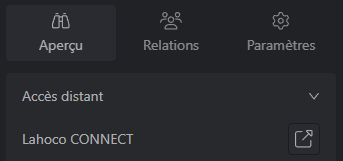
Direct remote access is also possible (by replacing AAAAAAAA with the serial number) :
-
https://my.lahoco.ch/connect/AAAAAAAA
Local access
Local access from the same IP network as your LAHOCO allows you to connect directly to it, for example from a tablet or a computer that stays at home all the time. Please note that only local users can connect locally.
Find the local address of LAHOCO
To find local address of your LAHOCO, access its web page from a browser.
-
http://lah-core-
AAAAAAAA.local (replacingAAAAAAAAwith the serial number)
By default, the login details are user and 123456.
Please not that for security reasons, it is essential to disable the local user account and replace it with another local account created by you, or at the very least to change its password.