How it works
LAHOCO SMART CONNECT provides remote access to KNX/IP gateways on the same network as LAHOCO CORE.
The KNX gateways on your network can be accessed remotely via myLAHOCO.
-
Go to myLAHOCO website
-
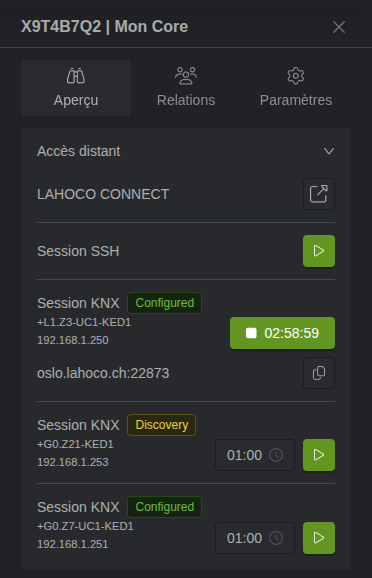
Access the side configuration panel of your LAHOCO CORE
-
Start a connection session to the relevant interface using the “play” button.
-
Open ETS, the KNX configurator
-
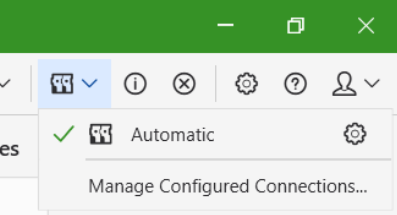
Go to the gateway configuration panel
-
Add a new IP Tunneling gateway with the following informations :
-
Server → the address specified in the myLAHOCO session (e.g., sydney.lahoco.ch)
-
Port → the port specified in the myLAHOCO session (e.g., 22873)
-
IP Protocol → leave on Automatic (both connection types are supported, but not all interfaces support TCP)
-
Network Address Translation → check the option to enable the connection in NAT mode
-
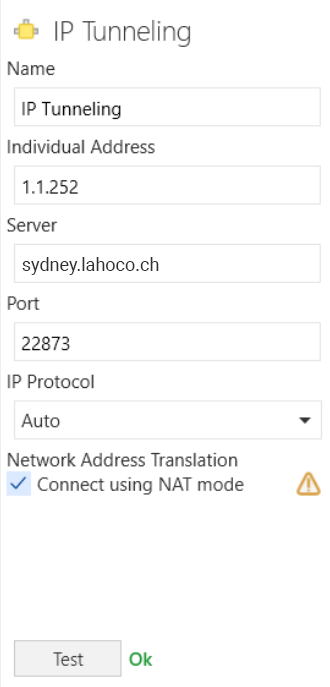
The server address and port number change during each KNX session for security purposes.