Home or remote access with LAHOCO SMART CONNECT allows you to securely access your installation from anywhere in the world. It requires a myLAHOCO user account. (See the page Create a myLAHOCO account if you do not yet have a myLAHOCO account.)
-
Log in to myLAHOCO with your personal account.
-
Access your installation from your LAHOCO CORE management page (right-hand panel):
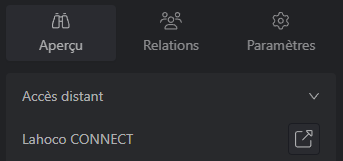
Direct remote access is also possible (replacing AAAAAAAA with the serial number):
-
https://my.lahoco.ch/connect/AAAAAAAA
Local access
Local access from the same IP network as your LAHOCO allows you to connect to it directly, for example from a tablet or a computer that stays at home at all times. Warning, only local users can connect locally.
Discover the local address of the LAHOCO
To discover the local address of your LAHOCO, access its web page from a browser.
-
http://lah-core-
AAAAAAAA.local (replacingAAAAAAAAwith the serial number)
By default, the credentials are user and 123456.
Warning, for security reasons, it is essential to disable the local user account in favor of another local account created by you, or at the very least to change its password.