How it works
LAHOCO SMART CONNECT makes it possible to remotely access the KNX/IP interfaces present on the same network as the LAHOCO CORE.
The KNX interfaces on your network can be accessed remotely via myLAHOCO.
-
Go to the myLAHOCO website
-
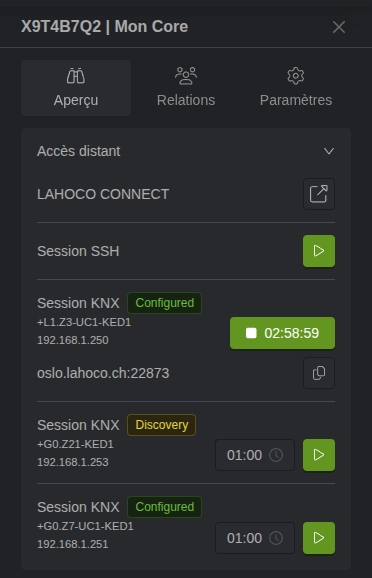
Go to the side configuration panel of your LAHOCO CORE
-
Start a connection session to the relevant interface using the “play” button
-
Open ETS, the KNX configurator
-
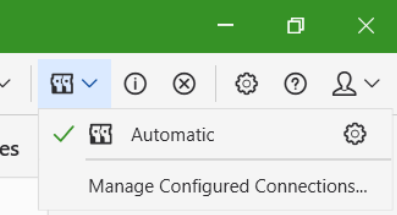
Go to the interface configuration panel
-
Add a new interface of type IP Tunneling with the following information:
-
Server → the address indicated in the session on myLAHOCO (e.g.: sydney.lahoco.ch)
-
Port → the port specified in the myLAHOCO session (e.g.: 22873)
-
IP Protocol → leave set to Automatic (both connection types are supported, but not all interfaces support TCP)
-
Network Address Translation → check the option to enable NAT mode connection
-
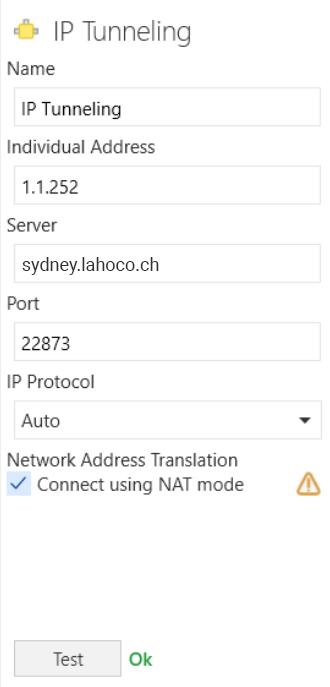
For security reasons, the server address and port number change with every KNX session.